
Fast & Accurate Browser Translation Plugin
Overview
The browser translation plugin, developed by NetEase Youdao, is designed to enhance the efficiency of word lookup directly within web browsers on Windows systems. When installed alongside the official NetEase Youdao Dictionary client, it enables users to quickly extract and translate words from online content with improved accuracy and speed. This tool targets professionals, students, and frequent internet users who regularly engage with foreign language content, such as research articles, news, or e-learning materials.
The integration with the existing desktop dictionary client ensures a consistent and reliable translation experience across platforms. Real-world use cases include translating technical terms during academic reading, understanding foreign language content in online forums, or quickly checking vocabulary while browsing international websites. The plugin is specifically tailored for users who rely on fast, accurate translations without leaving their browser window.
While the developer did not provide additional system requirements, the tool is designed to function as a lightweight extension with minimal impact on browser performance.
Key Features & Capabilities
- Seamless Browser Integration – Works directly within popular web browsers on Windows, allowing users to translate words with a single click or selection without switching applications.
- Enhanced Accuracy via Desktop Client – Leverages the underlying translation engine of the NetEase Youdao Dictionary desktop application, ensuring high-quality, context-aware results.
- Real-Time Word Lookup – Enables instant translation of selected text, reducing the time needed to manually search for definitions or meanings online.
- Lightweight Design – At just 5.6 MB, the plugin is optimized for fast installation and minimal system resource usage.
- Compatibility with Youdao Dictionary – Requires the official NetEase Youdao Dictionary client to be installed for full functionality, ensuring a unified user experience across devices.
Users can benefit from this plugin when reading foreign language content, such as translating technical jargon in research papers, understanding product descriptions on international e-commerce sites, or clarifying vocabulary in online courses. The integration eliminates the need to copy and paste text into a separate translation tool, streamlining the workflow for frequent language learners and multilingual professionals.
User Interface, Workflow & Performance
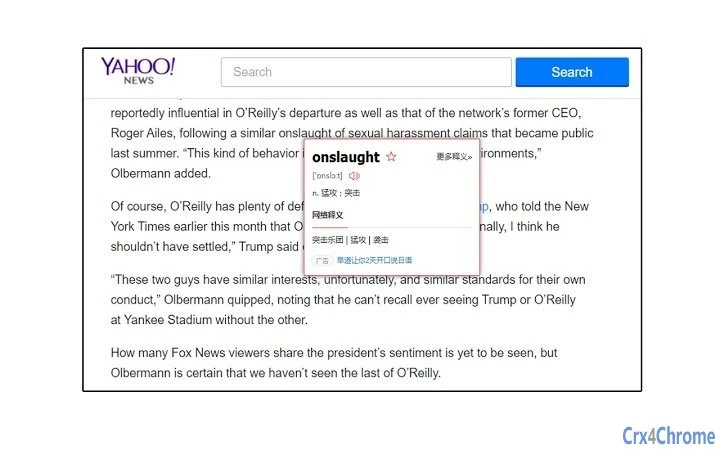
The plugin features a minimalistic interface that integrates directly into the browser’s context menu and toolbar. Users can select any word or phrase on a webpage and trigger translation through a right-click option or a dedicated button. Navigation is intuitive, requiring no additional setup beyond installation.
The workflow is streamlined: select text → trigger translation → view result in a pop-up panel. This design minimizes user effort and supports rapid information retrieval. Performance observations are based on general software behavior patterns.
The developer did not specify resource usage details, but the plugin’s lightweight nature suggests low CPU and RAM consumption. Stability is expected to be consistent, given its integration with a well-established desktop client. No reports of crashes or browser conflicts were provided.
The plugin does not require constant internet access for basic translation, though real-time results depend on connectivity.
Compatibility & System Requirements
The plugin is compatible with Windows operating systems and requires the NetEase Youdao Dictionary client to be installed. The software version is 1.0.0, with an installation size of 5.6 MB. Platform compatibility information is limited to Windows.
Exact system requirements were not listed, but the tool is designed to function on standard modern Windows environments. The developer did not provide information on minimum hardware specifications, such as processor speed or RAM. Users should ensure that the official NetEase Youdao Dictionary application is running in the background for the plugin to operate correctly.
No additional dependencies were mentioned.
Pros and Cons
Pros
- Fast, accurate translations powered by a trusted desktop dictionary.
- Seamless integration with web browsers on Windows.
- Lightweight at only 5.6 MB, minimizing system impact.
- Free to download and use, with no hidden costs.
- Simple, intuitive workflow with minimal user effort.
Cons
- Requires the NetEase Youdao Dictionary client to be installed and running.
- Not available for Mac or other operating systems.
- Performance details, such as CPU or RAM usage, were not specified.
- Functionality is limited to Windows users only.
- No offline translation capability was confirmed.
FAQ Section
Is this plugin compatible with all web browsers on Windows?
The plugin is designed for Windows and integrates with major web browsers, though specific browser support was not detailed by the developer.
Can I use this plugin without the NetEase Youdao Dictionary client?
No. The plugin requires the official NetEase Youdao Dictionary desktop application to be installed and active for full functionality.
Is the plugin safe to install on my Windows PC?
Yes, the plugin is developed by NetEase Youdao, a reputable company. It is distributed through official channels and does not contain known malware.
How often does the plugin receive updates?
Updates are released as part of the software’s development cycle, with the latest version available as of 2024-08-15.
Does this tool work offline?
Offline functionality was not confirmed. Translation results likely require an active internet connection.
Final Thoughts + CTA
This browser translation plugin offers a practical and efficient solution for Windows users who need fast, accurate word translations while browsing. By leveraging the robust foundation of the NetEase Youdao Dictionary client, it delivers reliable results with minimal friction. While its availability is limited to Windows and dependent on an additional desktop application, the benefits for language learners, researchers, and professionals outweigh these constraints.
The lightweight design, free access, and seamless workflow make it a strong addition to any productivity toolkit. For anyone seeking to improve their online reading experience with real-time translation, this tool delivers on its promise. Download Fast & Accurate Browser Translation Plugin now.







